Tampilkan postingan dengan label Converter. Tampilkan semua postingan

Free Download AMR to MP3 Converter

http://softwarenewbie.com/ Free Download AMR to MP3 Converter, As its name show, AMR to MP3 Converter is one free audio converter for AMR audio and MP3 audio, it can convert AMR audio to MP3 or convert MP3 audio to AMR. This software can support batch audio conversion; users can convert many files at one time. Adaptive Multi-Rate (AMR) is used in speech coding and involves audio data compression. Audio data compression allows for more storage on voice files. ".amr" is a popular filename extension for AMR. Many cell phones use AMR for speech recording storage. MP3 is a proprietary format, it is a common audio format for consumer audio storage. Users can use this program as one ringtone maker, if you like some music, you can use this software to make your style mobile ringtone by yourself.

The Extension of AMR File is ".amr", this is compressed audio format developed by Ericsson; used by many 3G cell phones for voice recordings such as MMS messages; incorporates the Algebraic Code Excited Linear Prediction (ACELP) algorithm, which is designed to efficiently compress human speech audio. AMR is especially associated with the Global System for Mobile Communications (GSM). Many software like Apple QuickTime Player, RealNetworks RealPlayer and AMR Player can play AMR audio. Please note: This file header of common across all AMR-NB files is always set to: 0x23, 0x21, 0x41, 0x4D, 0x52, 0x0A, if the header is not as it should be, the file is probably corrupted and should not be used. The AMR-WB codec adapts the bit-rate allocation between speech and channel coding, optimising speech quality to prevailing radio channel conditions. While providing superior voice quality over the existing narrowband standards, AMRWB is also very robust against transmission errors due to the multi-rate operation and adaptation. The adaptation is based on similar principles as in the previously standardised 3GPP/ETSI AMR codec (referred to also as the AMR narrow-band codec, AMR-NB).
Developer : visite website
System Operation :Windows 2000/XP/2003/Windows 7/Windows 8, About 2 MB of disk space. 
Licence : Freeware
Version :2.1.0 Size :4.5MB
Pub:softwarenewbie
Selanjutnya»

iPad To Computer Transfer

http://softwarenewbie.com/ SoftwareNewbie || Free iPad to Computer Transfer - Create a back-up copy of your iPad videos, movies, photo, music, playlist and more on your computer for free.

Tablet computer or simply Tablet, the most popular of which is iPad, has become the more favored choice by majority of consumers because of its weight, size and mobility.  Though, it may not be as powerful in terms of processing capability compared with Notebook/Laptop computers, nevertheless, it has and still is dominating the mobile scene. free-ipad-to-computer-interface

Here is the good news!  Now, you can take advantage of both technology by keeping the contents of your iPad in sync with your computer for free via AVGO’s iPad to computer transfer freeware.

Free iPad to Computer Transfer program allows you to make a back-up copy of your videos, movies, pictures, music , playlist, etc. from your iPad to computer so you don’t have to worry about losing the important files from your iPad.  You may save the back-up copy to a folder on your computer (disk) or to your iTunes.  Also, with the option to save the file/s to your iTunes, you can instantly sync the contents of your iPad to your other iOS  devices (like iPhone, iPod, iTouch).

Another benefit you can enjoy from Free iPad to Computer Transfer program is that you now have the opportunity to edit videos and photos (copied from iPad to computer) easily on your computer with your more advanced video/photo editing software, then transfer the edited file/s to iTunes and sync it with your iPad so you can use it for office or business presentations and more.

Developer : visite website
System Operation :Windows 95/98/ME/NT/2000/XP/2003/Windows 7/Windows 8
About 2 MB of disk space. 
Licence : Freeware
Version :2.1.0 Size :4.5MB
Pub:softwarenewbie
Selanjutnya»

Free PDF Converter Utilities

http://softwarenewbie.com/ SoftwareNewbie || 100 % Free PDF Converter Utilities Software is an ideal replacement for Adobe Acrobat as its simple, yet powerful function in PDF creation, editing, view and conversion which delivers maximum cost savings.
This complete PDF Management Tool is definitely one of the favorite PDF software that anyone should choose to preview, print, send, merge and split the PDF files, convert PDF to image and vice versa, convert PDF to TXT or Microsoft Word, scan hard document to digital PDF, extract text with OCR function, etc. As a well-designed and intuitive application, Free PDF Converter Utilities makes your work easy.

Features

    - Convert PDF to JPG, PNG, BMP, TIF, GIF, etc. and vice versa
    - Transform PDF to editable Word & TXT files by specifying the page range
    - Extract text from all images & scanned paper documents with superior conversion accuracy
    - Merge separate PDF files into a bigger one in any order
    - Split multipage PDF into smaller ones by even pages, bookmarks or any selected pages
    - Scan paper documents to a single PDF file
    - Presets with popular settings
    - Send the generated PDF through email
    - Open and preview any kinds of PDF documents
    - Edit PDF metadata like title, author, subject, etc.
    - Add or remove password or digitally sign your PDF for protection
    - Office-style Ribbon Interface makes everything easy
    - 100% Free, Safe & No Adobe Acrobat Needed!

Typical Applications

    1. Convert PDF files to images for easy access or further manipulation
    2. Convert PDF files directly to plain text to avoid heavy retyping any text and lighten the intensity of labor
    3. Create image PDFs with a lightweight and easy-to-use tool for office use or other purpose
    4. Merge separate PDF files into a bigger one for easy reading
    5. Split PDF into smaller ones to extract pages you want from PDF and deletes blank or unwanted pages
    6. Scan paper documents to a single PDF file for analysis & distribution
    7. Create editable and searchable MS Word or Text files from any images & PDF documents you supply

For editing and analysis
Share PDF files without changing the original by e-mail attachments & uploading online    Add password & digital signatures to PDF to protect the contents of the PDF

All Key Formats Are Supported

Input formats: *.pdf; *.BMP; *.JPEG; *.WMF; *.EMF; *.EPS; *.PNG; *.GIF; *.TIFF; *.EMF++; *.HTML5; *.G4 TIFF, etc.

Output formats: *.pdf; *.BMP; *.JPEG; *.WMF; *.EMF; *.EPS; *.PNG; *.GIF; *.TIFF; *.EMF++; *.HTML5; *.G4 TIFF, etc.

System Requirements

Free PDF Converter Utilities has been designed to work with Windows 7/8 2000/XP/2003/Vista/2008
Recommended Configuration: Pentium® class CPU - 1.4 GHz or more; True color (16,8 M colors) Video Card - 1280x1024; 1GB MB RAM


Developer : visite website
System Operation :Windows 95/98/ME/NT/2000/XP/2003/Windows 7/Windows 8
About 2 MB of disk space. 
Licence : Freeware
Version :2.1.0 Size :4.5MB
Pub:softwarenewbie
Selanjutnya»

Software Video to GIF Convert

http://softwarenewbie.com/
GIF files are an integral part of the Internet as it is the only image format that allows lightweight motion pictures and you usually find some interesting scenes in a movie or a video and want to extract it to create a GIF image as your distinct, unique and impressive avatar. Then, you're pretty lucky that Free Video to GIF Convert is specially developed for users to convert different part of video to animated GIF images by setting different starts and ends. A wide range of video formats like AVI, MP4, MPEG, FLV, MOV, 3GP and many more are supported.

Now, use this free video to GIF converter to create an animated GIF picture that can be shared with your friends or used in design projects.

Features

    - Create & share animated GIF for fun
    - Convert any video files to GIF animation within 3 clicks
    - Clip any part of videos to create GIF
    - Many optimal frame size options for amateur and professional use
    - Zoom in the current frame of video at its highest resolution for better view
    - Preview your self-created animated GIF images from start to end during conversion
    - Smooth conversion without any skipped frame
    - Convert 300+ video formats without difficulty
    - Supreme image quality
    - 100% Free, Safe!

How to Convert Video to GIF


Step 1: Input Video

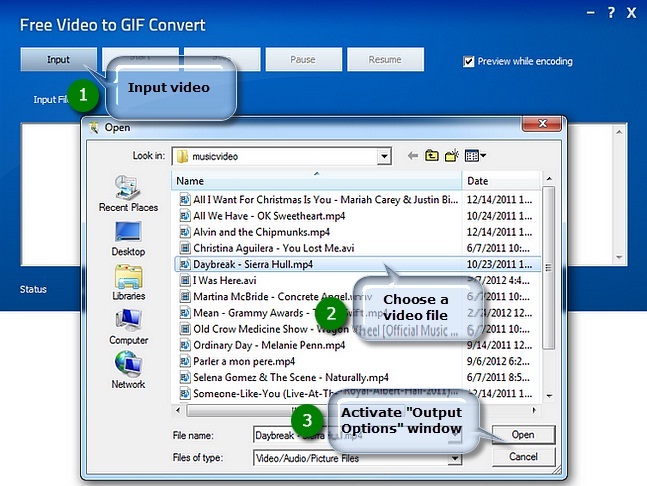
Launch Free Video to GIF Convert and click "Input" button to choose a video file from your computer and click "Open" to activate the "Output Options" window.

www.softwarenewbie.com

Step 2: Preset Output Settings

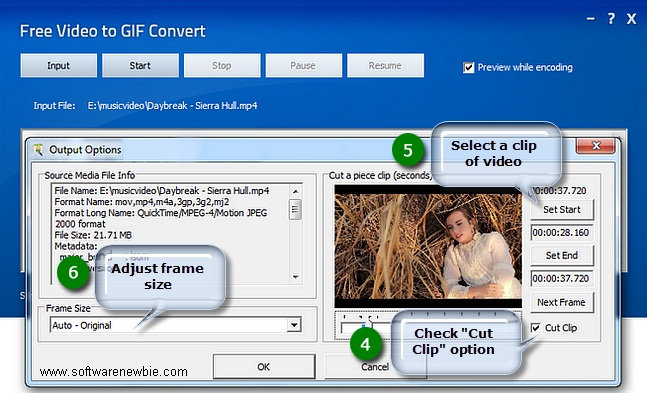
The detailed information of the source media file is displayed. Drag your mouse to move the slider to the position of time bar and use "Set Start/Set End" to specify the start/end frame. To choose more accurately, use "Next Frame" button. Remember to check "Cut Clip" to select a clip of video to make GIF (If you want to convert the whole video, uncheck it). Frame size is optional (Auto - Original; 128 * 96 - sqcif; 176 * 144 - qcif; and so on). If everything is ready, click "OK".

www.softwarenewbie.com

Step 3: Start Conversion

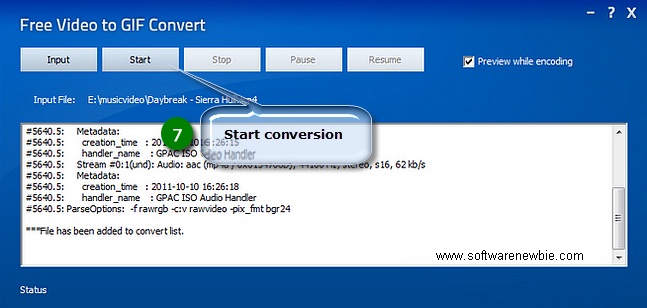
Click "Start" and some conversion information will be displayed. If you check the "Preview while encoding" box, a preview window will be activated through which you can preview the result. The conversion will be finished within just few seconds.

www.softwarenewbie.com

Developer : visite website
System Operation :Windows 95/98/ME/NT/2000/XP/2003/Windows 7/Windows 8
About 2 MB of disk space. 
Licence : Freeware
Version :2.1.0 Size :4.5MB
Pub:softwarenewbie
Selanjutnya»

Free Studio

http://softwarenewbie.com/ SoftwareNewbie || Free Studio is an all-in-one package bundling all free multimedia applications developed by DVDVideoSoft. Free Studio Manager has 8 sections for easy access to any application: YouTube programs; MP3 and Audio; CD, DVD and BD; DVD and Video; Photo and Images; Mobiles; Apple Devices; and 3D programs.

With this free software you can easily:
  • Convert video and audio files between different formats as well as iPod, PSP, iPhone, BlackBerry and all other popular mobile phones and devices
  •  Burn and rip DVDs and audio CDs
  • Upload and download YouTube videos and music to your computer, iPod, PSP, iPhone or BlackBerry
  • Perform basic editing of audio and video files
  • Record videos and make snapshots
  • Create 3D videos and images.

Free Studio does not contain spyware or adware. It's absolutely free and completely safe to install and run.

DVDVideoSoft's products are freeware. In order to maintain product development and provide you with high-quality software, DVDVideoSoft may bundle links to other websites and third-party apps installations including toolbars in its products. Every time DVDVideoSoft products are installed, you have an obvious option to accept or opt-out of such installations.

Developer : visite website
System Operation :Windows 95/98/ME/NT/2000/XP/2003/Windows 7/Windows 8
About 2 MB of disk space. 
Licence : Freeware
Version :2.1.0 Size :4.5MB
Pub:softwarenewbie
Selanjutnya»

Pixillion Image Converter

http://softwarenewbie.com/ SoftwareNewbie || Pixillion Image Converter,Pixillion is an easy to use image converter for Windows and Mac. Convert images to jpeg, gif, png, bmp, tiff and more,Rotate, resize and compress digital photos,  Easily add captions or watermarks to your images.
If You Like For Mac Device Clcik Here Software.

Put Any Photo Anywhere
The easy one-click process makes Pixillion perfect for converting your image files and digital photos for posting on the web, emailing to friends, or displaying on your mobile phone.
'
Powerful Image Conversion Features
Compress thousands of photos at a time with batch conversion. Resize images and add text captions or watermarks. Even convert images directly from the right-click menu.

Supported Image File Formats:
jpeg, jpg, png, gif, bmp, ico, psd, tga, pcx, tif, ras, pgf, ppm, raw, jp2, wbmp, pgf, raf,and many more.

Developer : visite website
System Operation :Windows 95/98/ME/NT/2000/XP/2003/Windows 7/Windows 8
About 2 MB of disk space. 
Licence : Freeware
Version :2.1.0 Size :4.5MB
Pub:softwarenewbie
Selanjutnya»

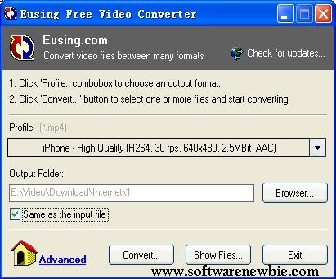
Eusing Free Video Converter

http://softwarenewbie.com/ SoftwareNewbie || Eusing Free Video Converter is a free video converter software to convert video files between many formats with ease. It uses the free FFmpeg encoder and supports most any video file that FFmpeg will convert. The output video files can be used on popular multimedia devices such as iPad, iPod, iPhone, PSP, MP4 player, mobile phone, Zune, etc. It can also convert video files to audio formats such as AC3, M4A, MP3, OGG, WAV or WMA. Eusing Free Video Converter can convert multiple files in multiple formats at one time. You can for example convert mpeg's, flv's, and mov's, all into avi's all at once.

Key Features
  • Converts multiple different files all to the same format at once.
  • Convert videos between various formats.
  • Convert video to audio.
  • Convert between audio formats.
  • No external codecs needed.
  • Display of estimated encode time, remaining time and encode speed.
  • Specify additional command line parameters for advanced users.
  • Easy to use - A couple of clicks to finish video converting.
  • 100% Spyware FREE, NOT contain any Spyware, Adware or Viruses
Quick Start Guide

    Step 1: Install and run the program.
    Step 2: Click 'Profile:' combobox to choose an output format.
    Step 3: Click 'Convert...' button to select one or more files and start converting.

Notes: Eusing Free Video Converter uses the excellent FFmpeg multimedia framework for converting videos. The FFmpeg project can be found at http://ffmpeg.org. FFmpeg is licensed under the GNU General Public License version 2.0 (GPLv2).
Developer : visite website
System Operation :Windows 95/98/ME/NT/2000/XP/2003/Windows 7/Windows 8
About 2 MB of disk space. 
Licence : Freeware
Version :2.1.0 Size :4.5MB
Pub:softwarenewbie
Selanjutnya»

CD to MP3 Converter 4.6

http://softwarenewbie.com/
SoftwareNebwie || Free CD to MP3 Converter is an easy-to-use free CD ripper software that allows you to extract audio files from a CD and convert them to MP3, Wav, Ogg or Wma format. It can automatically retrieve title information from the CDDB database, normalize the output files and supports additional LAME options. You can also use the software to record to MP3 with your microphone, or to convert WAV files to MP3, Ogg or Wma format. Support ID3 tag edit. You can use it freely. Free CD to MP3 Converter used AKRip and LAME encoder. AKRip and LAME are licensed under GNU LIBRARY GENERAL PUBLIC LICENSE.

LAME source codes are available at: http://lame.sourceforge.net
AKRip source codes are available at: http://akrip.sourceforge.net

CD ripper, Mp3 converter, cda to mp3 converter
 Rip selected tracks from audio CD and convert them to MP3 format or save as WAV format. The result is MP3 or WAV format based on your choice. You can select the format from options setting.

Wav to Mp3 converter, Mp3 to Wav converter
Encode WAV files into MP3. And Convert MP3 files to WAV.

Ogg converter
Rip CD and convert to Ogg format. And Convert Wav files to Ogg.

Wma converter
Rip CD and convert to Wma format. And Convert Wav files to Wma.

Support for normalization of audio files
Some CDs are recorded with different volume levels, and some MP3 files may also have different volume levels, with normalization function, you can make all output MP3 or WAV files in the same volume level.

Record from microphone or line in, save to Wav or Mp3
You can record your voice from microphone or other audio from line in. The output format is Wav or Mp3 or All based on your choice.

Gets information from remote CDDB server
You can get CD information from freedb database such as Track Titles, Artist, Album, Year, Genre and Comment information.

Easy to use interface that allows you to rip tracks of your Audio CD just by several clicks
You can select the track you want to rip and click Extract to start to extract. It's too easy.

Clear the play list of RealOne Player and Windows Media Player

You can clear the play list of RealOne Player and Windows Media Player when them not run.

Developer : visite website
System Operation :Windows 95/98/ME/NT/2000/XP/2003/Windows 7/Windows 8
About 2 MB of disk space. 
Licence : Freeware
Version :2.5.0 Size :2.5MB
Pub:softwarenewbie
Selanjutnya»

Hanso Converter Tools

http://softwarenewbie.com/
SoftwareNewbie || Hanso Converter Tools  is an audio program built to offer full support for CD ripping and audio encoding. It allows users to convert files into multiple popular formats including MP3, MP4/M4A, Ogg Vorbis, AAC, Bonk and FLAC. With Hanso Converter any type of user has the chance to work with a first-rate software for converting and storing audio files into the formats of his/her choice (which then can be transferred and listened to on different portable devices) and creating various audio projects. Once installed, the program is very easy to handle especially due to a very intuitive interface that allows the user to manage icons and tasks with no effort. In addition to Encoders and Playlists)


Hanso Converter Tools offers a CD Ripping option, CDDB/freedb online CD database (a feature that allows the users to access online database and introduce track info while converting) CDText, Plug-ins and Info Tags to make manageable all data associated with the audio files. Hanso Converter’s addition of a built-in player makes the experience all the more enjoyable since it allows easy playback of the tracks you want to convert or have converted into the mentioned formats.

Developer : visite website
System Operation :Windows 95/98/ME/NT/2000/XP/2003/Windows 7/Windows 8
About 2 MB of disk space. 
Licence : Freeware
Version :1.1.0 Size :11.3MB
Pub:softwarenewbie
Selanjutnya»

Hanso CD Extractor Tools

http://softwarenewbie.com/
SoftwareNewbie || Hanso CD Extractor is Ripping and Converting Audio Files is a lite but powerful application for managing a wide range of audio-related projects. Its core functions are ripping and converting audio files, helping you transfer your CD music collection into an easy-accessible library available anytime on your  hard drive or other portable devices.

With Hanso CD Extractor ripping is made amazingly simple and accurate through the use of jitter correction for quality control. The program normalizes your files to offer consistent volume levels and allows you to discover track information reading from the CD's .ini file or by using the CDDB database online to save you the time and effort of entering music metadata yourself. Hanso CD Extractor employs LAME as its default encoder but provides the user with the possibility to use it along with other encoding tools for different formats. The app’s functionality ensure a completely digital experience which means that, unlike many similar programs, it does not make the conversion of the file to analog and then back to digital.


http://www.softwarenewbie.com/

Hanso CD Extractor’ main features include:

   1. Easy-to-work-with interface.
   2. Ability to create PLS and M3U playlist files.
   3. Ability to normalize audio files.
   4. Support for various file formats/audio encoders includingWAV, MP3, OGG, VQF,
   5. Advanced jitter correction.
   6. Enables transcoding of compressed audio files.
   7. Support for ID3 V1 and V2 tags.
   8. Support for CDDB.
   9. Support for recording using the analog input line.
 10. Built-in Player.

http://www.softwarenewbie.com/


Developer : visite website
System Operation :Windows 95/98/ME/NT/2000/XP/2003/Windows 7/Windows 8
About 2 MB of disk space. 
Licence : Freeware
Version :1.1.0 Size :12.1MB
Pub:softwarenewbie
Selanjutnya»